ERP FOR GROWING BUSINESSES

Your business is growing.
Are your systems ready?

Connect sales, purchasing, inventory, finance and manufacturing in one ERP platform built to give management real-time control.

One connected system. One source of truth.
View / Download Brochures
Executive OverviewILLUSTRATION
Sales+18.4%
Inventory98.2%
Cash FlowHealthy
Connected business flow
SalesInventoryFinance
PurchasingProductionReports
ApprovalsAudit TrailMulti-Branch

MaluOne ERP overview

See the complete system, business documents and working flows between teams.

Explore the system and workflows
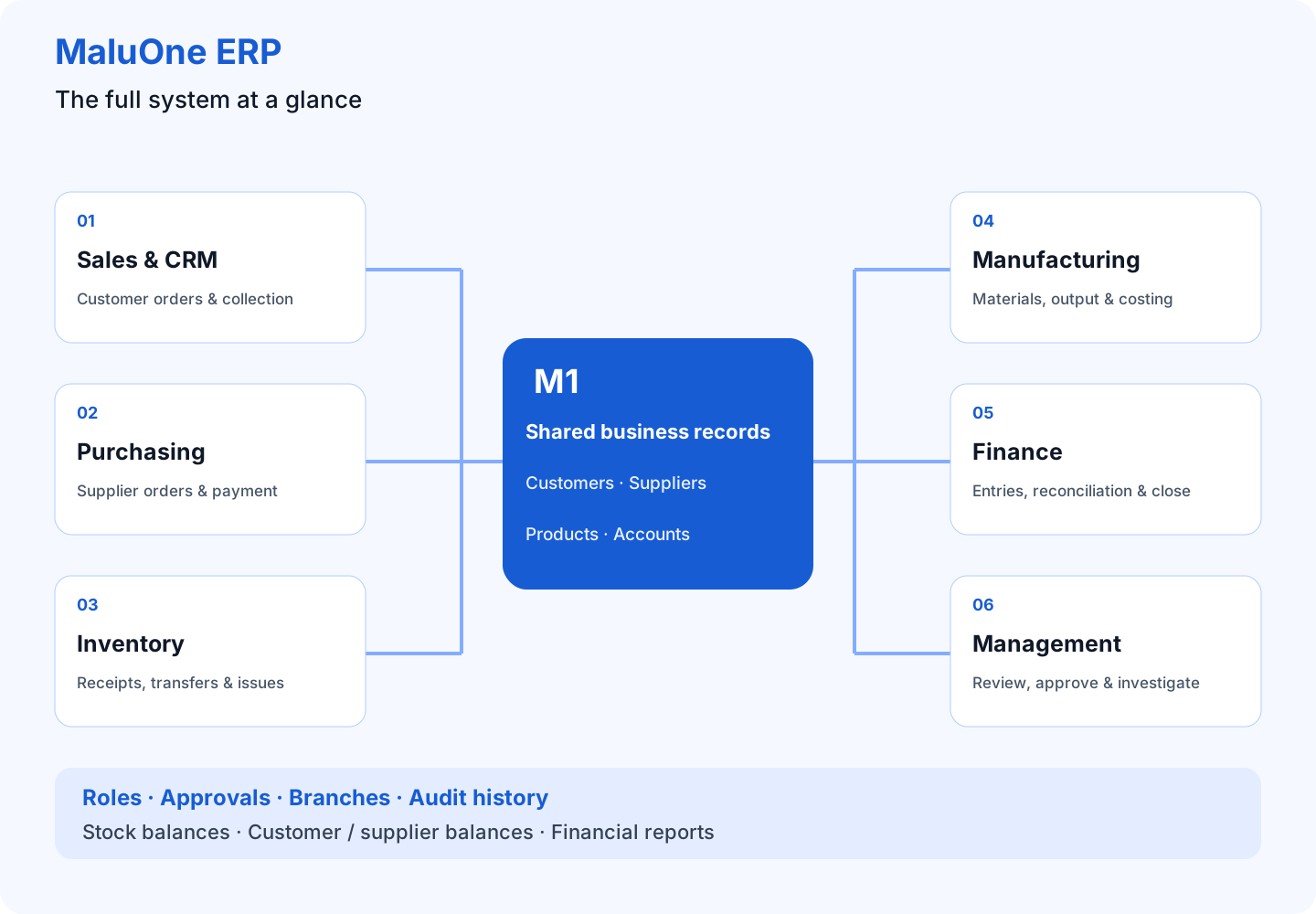
MaluOne ERP system diagram

CORE ERP

Run the whole business in one system

Replace disconnected spreadsheets and isolated software with workflows that share the same operational and financial data.

01

Sales & CRM

Quotation → Sales Order → Delivery → Invoice → Receipt

Learn more about Sales & CRM

Sales advisor reviewing a customer order, warehouse staff preparing delivery, and finance matching invoice and receipt records.
Illustrated business example — not a product screenshot.
Full guide: problems, examples & solutions →

Follow the customer order from the first quotation through delivery, invoicing and collection.

THE EXAMPLE AT A GLANCE

Customer order · 100 units

60Delivered
40Pending

60 + 40 = 100 units

Invoice · 12 million LAK

5mReceived
7mUnpaid

5m + 7m = 12m LAK

Illustrative figures; confirm the agreed business rules. Monetary examples exclude tax and other adjustments.

Customer and quotation records

Keep customer requirements and proposed products together when preparing a quotation.

Orders and deliveries

Connect confirmed orders with the goods that need to be delivered.

Invoices and receipts

Follow what has been billed and collected alongside the sales workflow.

Request a Sales & CRM Demo
02

Purchasing

Purchase Request → PO → Receive → Supplier Invoice → Payment

Learn more about Purchasing
Buyer reviewing a supplier order while receiving staff count delivered cartons and inspect damaged goods.
Illustrated business example — not a product screenshot.
Full guide: problems, examples & solutions →

Explore how purchasing connects supplier orders, goods received and the amounts your business owes.

THE EXAMPLE AT A GLANCE

Purchase order · 100 cartons

80Received
20Outstanding

Record actual receipt: 80, not 100

Supplier invoice review

30mInvoice
24mReceived value
6mDifference

At 300,000 LAK per carton · review before payment

Illustrative figures; confirm the agreed business rules. Monetary examples exclude tax and other adjustments.

Purchase planning

Start with a purchase request and prepare an order for the supplier.

Receiving goods

Compare deliveries with purchase orders and follow the quantities received.

Supplier payments

Connect supplier invoices and payments with the purchasing process.

Request a Purchasing Demo
03

Inventory

Warehouse, lot/serial, transfers, picking, stock control and valuation

Learn more about Inventory
Warehouse staff scanning stock, transferring cartons between storage areas and checking a physical count.
Illustrated business example — not a product screenshot.
FIFO, FEFO & inventory costingFull guide: problems, examples & solutions →

Understand where your stock is, how it moves and how its value connects to your financial records.

THE EXAMPLE AT A GLANCE

Stock after transfer and issue

50Warehouse A
30Warehouse B

100 received − 20 issued = 80 total

Warehouse B count review

30Recorded
28Counted
2Investigate

Retain count evidence before approving a correction

Illustrative figures; confirm the agreed business rules. Monetary examples exclude tax and other adjustments.

Warehouse management

Organize stock by warehouse and review available quantities before receiving, transferring or issuing goods.

Stock movements

Follow receipts, issues and transfers so your team can explain changes in stock balances. Discuss lot and serial tracking for your products.

Stock valuation

Review stock quantities alongside their value and discuss how inventory costing should connect to accounting.

Request an Inventory Demo
04

Finance

GL, AR/AP, journals, cash/bank, tax, financial statements and closing

Learn more about Finance
Finance team comparing invoices, receipts and bank records during reconciliation.
Illustrated business example — not a product screenshot.
Full guide: problems, examples & solutions →

Explore the connection between daily transactions, accounting records and financial reporting.

THE EXAMPLE AT A GLANCE

Customer balance · million LAK

10mInvoice
4mReceipt
6mUnpaid

10m − 4m = 6m outstanding

After an approved credit

6mBefore credit
1mCredit
5mRemaining

6m − 1m = 5m outstanding

Illustrative figures; confirm the agreed business rules. Monetary examples exclude tax and other adjustments.

Receivables and payables

Review customer amounts due and supplier obligations alongside invoices and payments.

General ledger and cash

Follow journals and cash or bank transactions through the accounting process.

Reporting and closing

Discuss financial statements, tax requirements and period-end procedures with the demonstration team.

Request a Finance Demo
05

Manufacturing

BOM, routing, production orders, material issue, output and costing

Learn more about Manufacturing
Furniture workshop connecting material storage, table assembly, inspection and rework.
Illustrated business example — not a product screenshot.
Full guide: problems, examples & solutions →

Explore the production flow from required materials to finished output and its cost.

THE EXAMPLE AT A GLANCE

Production order · 50 tables

48Completed
2In progress

Planned quantity is not finished stock

Reconcile 204 issued legs

192In finished tables
8Unfinished work
4Damaged

192 + 8 + 4 = 204 legs

Illustrative figures; confirm the agreed business rules. Monetary examples exclude tax and other adjustments.

Materials and routing

Discuss bills of materials and the steps needed to make your products.

Production orders

Follow planned production, materials issued and finished goods received.

Production costing

Review how material usage and production output contribute to product costs.

Request a Manufacturing Demo
06

Management

Approvals, branches, roles, dashboards, KPIs and audit trail

Learn more about Management
Managers reviewing business documents, approval responsibilities and branch performance together.
Illustrated business example — not a product screenshot.
Full guide: problems, examples & solutions →

Explore the controls and reporting that help managers oversee work across teams and branches.

THE EXAMPLE AT A GLANCE

Sample approval rule

5mReview threshold
7mPurchase request

7m exceeds 5m LAK: manager review required

Decision and change review

01Buyer prepares
02Manager reviews
03Changes checked

Verify authority and retained history in the demo

Illustrative figures; confirm the agreed business rules. Monetary examples exclude tax and other adjustments.

Roles and approvals

Discuss who can perform each task and which transactions require approval.

Branches and dashboards

Review the information managers need to follow operations across the business.

Audit history

Explore how transaction history supports review and accountability.

Request a Management Demo

CONTROL & VISIBILITY

From daily operations to management decisions

MaluOne ERP turns transactions into controlled processes, accounting entries and management information—without rebuilding the same data in multiple systems.

01One source of business data
02Maker-checker approvals and audit trail
03Real-time inventory and financial visibility
04Automatic accounting from business transactions
05Multi-branch and multi-user control
06Web and mobile-ready workflows

INDUSTRY SOLUTIONS

Built for the way your business works

Start with the processes you need now and expand as operations become more complex.

Trading & Distribution

Control quotations, orders, purchasing, warehouse, receivables and profitability.

View Trading & Distribution solution
Buyer reviewing a supplier order while receiving staff count delivered cartons and inspect damaged goods.
Illustrated business example — not a product screenshot.
FIFO, FEFO & inventory costingRead the complete industry guide →
01

Record the order and agreed delivery dates.

02

Check available stock and plan the shortage.

03

Record actual quantities dispatched and delivered.

04

Match invoices and receipts to the delivery agreement.

Illustrative workflow — not a product screenshot.

Keep customer promises connected to warehouse stock and payment.

Example business case

A distributor receives an order for 100 cartons. Only 70 are available. The team agrees a partial delivery, arranges the remaining 30 and tracks the unpaid invoice balance. Use this scenario to explore the sales, warehouse and finance handover in your demo.

THE EXAMPLE AT A GLANCE

Customer order · 100 cartons

70Delivered
30Outstanding

Keep the remaining delivery commitment visible

Invoice · 35 million LAK

20mCollected
15mUnpaid

35m − 20m = 15m unpaid

Illustrative figures; confirm the agreed business rules. Monetary examples exclude tax and other adjustments.
A process to explore in your demo
  1. Record the order and agreed delivery dates.
  2. Check available stock and plan the shortage.
  3. Record actual quantities dispatched and delivered.
  4. Match invoices and receipts to the delivery agreement.
Common mistakes and how to avoid them
Promising stock before checking availability

What goes wrong: The customer expects 100 cartons while the warehouse can dispatch only 70.

How to avoid it: Confirm quantities and delivery dates before committing; record any partial delivery agreement.

Mixing cartons and individual units

What goes wrong: A quantity entered in the wrong unit changes stock balances and pricing.

How to avoid it: Agree the stocking and selling units and verify conversion quantities on each document.

Treating an invoice as money received

What goes wrong: Sales appear complete while customer balances remain unpaid.

How to avoid it: Review outstanding invoices and record receipts against the correct customer documents.

Bring your own process to the demo so we can confirm the modules and setup it needs.

Request a Trading & Distribution Demo

Manufacturing

Connect material planning, production, QC, inventory and finance.

View Manufacturing solution
Furniture workshop connecting material storage, table assembly, inspection and rework.
Illustrated business example — not a product screenshot.
Read the complete industry guide →
01

Review the material list and planned output.

02

Issue materials against the production order.

03

Record actual output, scrap and remaining work.

04

Compare material usage and costs with the plan.

Illustrative workflow — not a product screenshot.

Follow materials into production and explain the cost of finished goods.

Example business case

A furniture workshop plans 50 tables. It reviews the material list, issues timber and fittings, records 48 completed tables and identifies material used for rework. Use this example to discuss production quantities, remaining work and costing with the demo team.

THE EXAMPLE AT A GLANCE

Production plan · 50 tables

48Completed
2Remaining

Review remaining materials and the delivery date

One order, three team views

01Sales commitment
02Actual production
03Cost evidence

Connect the job reference across each handover

Illustrative figures; confirm the agreed business rules. Monetary examples exclude tax and other adjustments.
A process to explore in your demo
  1. Review the material list and planned output.
  2. Issue materials against the production order.
  3. Record actual output, scrap and remaining work.
  4. Compare material usage and costs with the plan.
Common mistakes and how to avoid them
Using an outdated material list

What goes wrong: Purchasing buys the wrong quantities and production runs short.

How to avoid it: Review and approve the current material list before releasing the order.

Leaving scrap and rework unrecorded

What goes wrong: Stock and production costs no longer explain what actually happened.

How to avoid it: Record additional material usage and its reason when it occurs.

Counting planned output as completed output

What goes wrong: Sales promises goods that are still unfinished.

How to avoid it: Record actual finished quantities and review any work still in progress separately.

Bring your own process to the demo so we can confirm the modules and setup it needs.

Request a Manufacturing Demo

Retail

Manage products, stock movement, sales, purchasing and financial reporting.

View Retail solution
Warehouse staff scanning stock, transferring cartons between storage areas and checking a physical count.
Illustrated business example — not a product screenshot.
Read the complete industry guide →
01

Check products and quantities when receiving stock.

02

Record dispatch and receipt for branch transfers.

03

Record sales and inspect returned goods.

04

Compare stock counts and payment totals with recorded transactions.

Illustrative workflow — not a product screenshot.

Keep branch stock, sales and daily collections consistent.

Example business case

A retailer receives 200 items and transfers 80 to a second branch. That branch sells 25 and receives two customer returns. If there are no other movements, its expected stock is 57. Use this example to explore transfers, returns and reconciliation.

THE EXAMPLE AT A GLANCE

Branch stock reconciliation

80Received
25Sold
2Returned

80 − 25 + 2 = 57 physically held

Inspect the two returns

56Potentially saleable
1Damaged / hold

57 physical items ≠ 57 saleable items

Illustrative figures; confirm the agreed business rules. Monetary examples exclude tax and other adjustments.
A process to explore in your demo
  1. Check products and quantities when receiving stock.
  2. Record dispatch and receipt for branch transfers.
  3. Record sales and inspect returned goods.
  4. Compare stock counts and payment totals with recorded transactions.
Common mistakes and how to avoid them
Moving goods without a transfer record

What goes wrong: One branch shows stock it no longer has, while another appears short.

How to avoid it: Record both the sending and receiving sides of each transfer.

Returning damaged goods to saleable stock

What goes wrong: Staff may sell an item that should have been held for inspection.

How to avoid it: Check the returned item and record its condition and intended handling.

Combining all payment types into one total

What goes wrong: Cash discrepancies become difficult to distinguish from card or bank settlement timing.

How to avoid it: Reconcile each payment method against its supporting records at daily close.

Bring your own process to the demo so we can confirm the modules and setup it needs.

Request a Retail Demo

Service

Manage customers, service revenue, expenses, billing, collections and accounting.

View Service solution
Sales advisor reviewing a customer order, warehouse staff preparing delivery, and finance matching invoice and receipt records.
Illustrated business example — not a product screenshot.
Read the complete industry guide →
01

Document the scope, price and payment milestones.

02

Record approved changes and delivery evidence.

03

Review related expenses before final billing.

04

Apply the deposit and follow the outstanding balance.

Illustrative workflow — not a product screenshot.

Connect the agreed scope of work with delivery, billing and collection.

Example business case

A service company agrees a maintenance job with a 30% deposit and the balance after acceptance. The customer then requests additional work. Use this scenario to discuss scope approval, related expenses, final billing and the remaining balance.

THE EXAMPLE AT A GLANCE

Revised agreement · million LAK

10mOriginal scope
2mApproved extra
12mRevised total

Approve the change before performing extra work

Apply the customer deposit

12mAgreed amount
3mDeposit paid
9mRemaining

12m − 3m = 9m remaining

Illustrative figures; confirm the agreed business rules. Monetary examples exclude tax and other adjustments.
A process to explore in your demo
  1. Document the scope, price and payment milestones.
  2. Record approved changes and delivery evidence.
  3. Review related expenses before final billing.
  4. Apply the deposit and follow the outstanding balance.
Common mistakes and how to avoid them
Accepting extra work without approval

What goes wrong: The team incurs costs that the customer may dispute.

How to avoid it: Confirm scope and price changes before performing additional work.

Leaving expenses disconnected from the job

What goes wrong: Management cannot reliably explain the margin on the work.

How to avoid it: Keep a consistent job reference on expense records and supporting documents.

Forgetting a deposit during final billing

What goes wrong: The customer may be asked to pay the same amount twice.

How to avoid it: Reconcile deposits, final invoices and receipts before confirming the balance due.

Bring your own process to the demo so we can confirm the modules and setup it needs.

Request a Service Demo

ERP Implementation & Business Success

Understand the problem, avoid implementation mistakes and prepare your team for reliable daily work.

MaluOne ERP Brochures

View a brochure or download the PDF to read and share with your team.

WHY MALUONE

Business process first.
Software second.

MaluOne ERP is designed around complete business flows—not isolated screens. Operational transactions can drive approvals, inventory movement, accounting and management reporting as one controlled process.

Discuss your process
M1MaluOne ERPCentral Business Data
Sales
Purchase
Inventory
Finance
Production
Management

PLAN YOUR NEXT STEP

Choose ERP around a real business process

Start with the problem you need to solve. Confirm the workflow and scope before planning implementation.

1. Bring your example

Choose an order, stock movement or reporting problem and bring sample documents.

2. Review the workflow

Ask to see normal transactions and exceptions, including partial deliveries, returns and corrections.

3. Agree the scope

Confirm modules, users, migration, training, support and acceptance criteria.

Explore implementation and support planning →

COMMON QUESTIONS

Before you book a demonstration

Understand what to prepare and what to confirm with the team.

Where should we start?

Choose one important business process and demonstrate it with your own sample documents. Agree the required modules and acceptance criteria before expanding scope.

Can we move data from spreadsheets?

Prepare clean master data and opening balances. Confirm import formats, supported data types and reconciliation responsibilities during implementation planning.

How much does implementation cost?

Request a scoped proposal. Identify users, branches, modules, migration, training and support requirements so the proposal describes what is included. No fixed pricing is published here.

How long will implementation take?

Timing depends on scope, data quality, integrations and team availability. Agree a phased schedule after reviewing your processes; this website does not promise a fixed delivery date.

Read all questions and answers →

LET'S TALK ERP

See MaluOne ERP with your own business process

Tell us how your company works. We will prepare an ERP demo around your sales, purchasing, inventory, accounting or manufacturing flow.

✓ Process assessment✓ Personalized ERP demonstration✓ Implementation roadmap

Request a Demo

This form sends your contact details and requirements to MaluOne CRM for inquiry follow-up. Please do not include passwords or confidential business records.